E-commerce & product hero shots
Clean or lifestyle backgrounds, selling mood, multi-aspect heroes and PDP assets—great when you need a consistent look and fast iteration.

 Midjourney×
 LimaxAI
One of the world’s most loved AI art models: go from photoreal photography to abstract art and generate stunning, high-quality images in a single flow.
 1 / 6
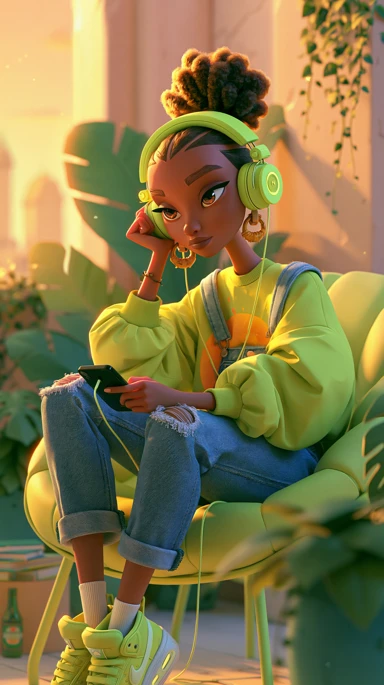
1 / 6From idea to polished frame in seconds—every piece below is a real generation.
Use cases
With long prompts and reference images, Midjourney fits many subjects and deliverables. Here are common directions teams search for.
Clean or lifestyle backgrounds, selling mood, multi-aspect heroes and PDP assets—great when you need a consistent look and fast iteration.
Turnarounds, expressions, outfit variants—pair with Niji for crisp line work and cel-style color.
Interior/exterior mood, materials and light, concept boards for reviews and pitches.
Key visuals, campaign KVs, social headers—steer layout with aspect ratio and style references.
Model lineup
Full Midjourney family plus Niji models tuned for anime and illustration—pick what fits your brief.
| Version | Highlights | Best for | Parameters |
|---|---|---|---|
| MJ7 | Latest generation: richer detail, stronger semantics, much better hands and faces | Pro work, commercial design, illustration | --s 0-1000, --q 1-4, --ar any |
| MJ6.1 | Clearer quality and style consistency; supports higher resolutions | High-end renders, brand visuals, polish passes | --s 0-1000, --q 0.25-2, --ar any |
| MJ6.0 | Better typography in images; more accurate natural-language understanding | Text-in-image, concept art, environment shots | --s 0-1000, --q 1, --ar any |
| Niji6 | Tuned for anime/illustration—line art, color, and expressions stay sharp | Characters, manga-style art, “2D” design | --s 0-1000, --q 1, --ar any |
| Niji5 | Classic anime look—vivid color and strong composition | Anime illustration, cartoon, chibi-style characters | --style cute/expressive/scenic |
Capabilities
A quick map of what you can configure across the Midjourney lineup.
Versions
MJ7 / MJ6.1 / Niji6
Includes the latest MJ7 plus Niji anime models, updated as the ecosystem evolves.
Speed
Fast / Relax
Fast prioritizes the queue for quicker results; Relax is ideal for exploration and volume—just expect a longer wait.
Reference images
Multi-reference
Image prompts (--iw), style reference (--sref), and character reference (--cref).
Output resolution
High resolution
Multiple high-res export paths for print and large-format display.
Editing
Regional edits & variants
Vary, zoom out, pan, remix, and more to iterate without starting from zero.
Aspect ratio
Flexible ratios
1:1, 4:3, 3:2, 16:9, 9:16, and more—match your channel and crop.
Prompting
Say what you are photographing or illustrating, then layer style, light, lens, and aspect ratio—clear structure beats a pile of adjectives. This follows the common “subject + style + light + mood + parameters” pattern used across the community.
① Subject & scene (who / where / doing what) ② Medium & style (photo, illustration, 3D, UI mock, etc.) ③ Light & palette (golden hour, soft fill, neon contrast…) ④ Lens & composition (wide, shallow DOF, symmetry, negative space) ⑤ Ratio & knobs (aspect, stylize, quality, reference weights). For web/UI work, add layout cues—nav, hero, card grid—to steer toward landing-page-ready comps.
Start with a short prompt to lock composition and vibe, then add materials, micro-expressions, or brand colors—avoids long prompts that fight each other.
For hero banners, landing heroes, or vertical social, spell out “hero section / full-bleed / lots of whitespace” and pick the right aspect (e.g. 16:9, 9:16) in the UI or parameters.
Style refs (sref family) lock palette and brush language; character/product consistency pairs well with character refs and image-weight tuning—more reliable than “in the style of …” alone.
Small variations, zoom-outs, or pans on the same prompt save tokens versus rewriting from scratch—great for long-scroll pages or wide carousels.
Ideas & prompts
E-commerce landing, photo portfolio, SaaS marketing site, editorial layout—each mood includes an English prompt you can copy and tune for brand colors and products.
ecommerce landing hero, clean grid, soft shadows, coral and teal accents, minimal typography, CTA button mock, high-end web UI --ar 16:9
photography portfolio website hero, large landscape hero image, thin top nav, generous whitespace, editorial caption style --ar 16:9
modern SaaS homepage mockup, navy and white, product dashboard preview card, subtle gradients, trustworthy fintech vibe --ar 16:9
fashion editorial web layout, asymmetric grid, bold serif headlines, muted background, high contrast accents --ar 3:2
Parameters & refs
On Discord these often appear as suffix flags; in web tools they map to sliders and advanced settings. Valid ranges depend on the active model—check in-product help for the latest.
| Parameter | What it does | Tip |
|---|---|---|
| --ar (aspect ratio) | Sets canvas ratio such as 1:1, 16:9, or 9:16. | Pick the channel first—social vertical, deck widescreen, print square—then choose the ratio. |
| --stylize / stylize | How “interpretive” the model is; higher values feel more artistic, lower values stick closer to the literal prompt. | Lower for literal product shots; raise for poster or illustration energy. |
| --quality / quality | Detail/render cost tier—impacts texture and time. | Use lower tiers for exploration; bump quality before upscale or final delivery. |
| --chaos | Variety between results; high values encourage wilder compositions and mixes. | High for brainstorming; conservative or default when you need product consistency. |
| --seed | Locks randomness so you can reproduce a similar composition and palette. | Save the seed when you like a comp, then tweak wording in small steps to compare. |
| Image prompt / --iw | Uses an upload to steer layout, subject, or color with adjustable weight. | Great for product plates, character turnarounds, or mood-board collages. |
| Style reference / --sref | Locks palette, brushwork, or material language from a reference image. | Ideal for brand systems and series posters that must match. |
| Character reference / --cref | Emphasizes face, hair, outfit consistency for people or mascots. | Pair with a clear portrait reference for serial illustrations or VTuber-style sets. |
Get started
No specialist background required—ship frames quickly.
Use natural language—mix languages if you want. More concrete detail usually yields tighter results.
Add reference images, pick aspect ratio and quality tier, then generate in one click.
Grab full-resolution files when you are happy—suitable for commercial work subject to your plan and our Terms.
FAQ
LimaxAI bundles generation, billing, and workflow in one place with localized UI and prompt assistance, plus integrations tailored to teams using LimaxAI—so you spend less time switching tools or accounts.
Yes—outputs you generate through LimaxAI are licensed for commercial use within the limits of your subscription and our Terms of Service, including print and digital distribution.
Common raster formats such as PNG and JPG, including high-resolution downloads suitable for professional print.
Each generation returns multiple candidates so you can compare compositions and pick the best fit.
Include subject, style cues, lighting or palette preferences, and aspect ratio. Specific, structured prompts usually outperform vague one-liners.
More on site
Jump from this landing page into the live tool, pricing, and the rest of the LimaxAI catalog.
Try it now
Join creators worldwide and turn briefs into finished visuals faster.