Immersive audio–video realism
Motion stability and physically plausible movement, paired with native audio cues, so reviews feel closer to camera originals.

A next-generation model tuned for unified text / image / audio / video conditioning paths—so you can brief shots like a director: lock composition, steer motion, and iterate with smaller prompt deltas.
Prefill a prompt, tune ratio and duration, then jump to the workspace with one click.
A practical snapshot of how teams brief multimodal video today.
The product story centers on a unified multimodal path: steadier timebase, more believable physics, and audio generated in lockstep with picture—not patched in as an afterthought. In LimaxAI you work shot-by-shot with the controls surfaced in the workspace: model, ratio, duration, references, and optional audio where your tier supports it.
How the model is pitched for real delivery—not a spec sheet.
Motion stability and physically plausible movement, paired with native audio cues, so reviews feel closer to camera originals.
Prompts plus references—image, audio, or short clips where supported—to choreograph performance, light, and lens grammar without rewriting the entire brief each time.
Outputs framed as plates for ads, social, and previz—short loops you can cut, grade, and replace on a timeline.
Mapped to the controls you will see in the LimaxAI workspace.
Lock composition with a first frame or reference images—useful for product heroes, portraits, and branded layouts before motion is synthesized.
When pure video conditioning is not available, combine strong camera verbs with still references to approximate complex paths.
Treat each generation as a modular shot you can stitch on the timeline, then iterate with small prompt deltas.
LimaxAI optimizes for clean exports you can refine with masks, cuts, and audio sweetening in your usual toolchain.
Seven strengths that show up in delivery reviews. Limits depend on your plan and queue.
Higher-fidelity frames with headroom for grade—especially on longer shots where noise used to crawl in.
Where enabled, pair dialogue / ambience intent with picture so mouth and room tone drift less between cuts.
Structure prompts as beats (establish → push → payoff) so the model can preserve intent across a short clip.
Combine text with references permitted in the workspace—still images, optional audio flags on supported models, and omni lists on Seedance 2.0.
Repeat non-negotiables (wardrobe, logo geometry, palette) when you need the same hero across variants.
Gravity, contact, and fluid motion that read correctly at full playback speed—especially for product and handheld scenes.
From clean commercial to stylized fiction—iterate with narrow prompt edits instead of full rewrites.
A quick orientation across common product tiers. Figures move with vendor SKUs—verify in each console and in LimaxAI before you lock a delivery plan.
| Capability | Seedance 2.0 | Sora 2 (OpenAI) | Veo 3 (Google) | Kling 2.6 (Kwai) |
|---|---|---|---|---|
| Max clip length (typical consumer tier) | Up to ~15s on typical tiersAhead | ~15s (higher tiers cite longer) | ~8s typical | ~10s typical |
| Multimodal references | Text / image / audio / video references in one stackAhead | Limited / evolving | Text + image common path | Text + image common path |
| Multi-beat storytelling | Stronger native multi-beat framingAhead | Weaker in third-party comparisons | Often single-beat | Often single-beat |
| Audio–video sync | Joint audio–video generation pathAhead | Often partial | Often supported | Varies by clip type |
| Character / product consistency | Stronger identity persistence in long takesAhead | Strong in flagship demos | Solid in flagship demos | Strong in flagship demos |
| Physics plausibility | Strong benchmark storyTie | Strong in flagship demos | Solid in flagship demos | Strong in flagship demos |
| Typical delivery resolution cited | 1080p / 2K commonly citedAhead | 1080p common | Up to 4K on some tiers | 1080p common |
*Typical marketing-tier positioning; resolution, duration, and modalities change with product updates.
Beyond stacking multimodal tricks, the generation stack is pitched as a base-model lift: more believable physics, cleaner motion grammar, tighter instruction following, and calmer style drift. That is what makes long takes, contact-rich actions, and product rotations less “lottery” when your brief names materials, lens, and pacing.
You can steer with text plus references—still frames for layout, short clips for motion grammar, and audio for rhythm where the stack allows it. Pair crisp prompts with references so the model locks what must not move while you iterate beats, not entire scripts. What you can attach depends on your LimaxAI plan and the active model.
Faces drifting, product labels smearing, micro-type collapsing, and scene tone jumping are the pains reviewers cite first. The 2.0 narrative doubles down on holding identity, wardrobe, and key props across shots—then you finish masks and editorial in your NLE.
Reference-first workflows: set look with an image, motion grammar with a clip, and rhythm with a few seconds of audio—then tighten with prompts so iteration feels closer to directing than gambling.
Faces, wardrobe, type, and props stay closer across shots—fewer surprise re-rolls on pick-ups.
Where video reference is supported, lean on it for complex blocking; otherwise combine verbs with still references.
Recreate ad beats, stylized transitions, and cinematic flourishes with references plus tight prompt deltas.
Let the model propose in-between beats while you keep non-negotiables explicit in the brief.
Smooth extensions when the product path supports it—otherwise export plates and stitch editorially.
More natural timbre and cleaner line reads when audio-aware tiers are enabled.
Fewer hard cuts inside a single move—better for walkthroughs and performance shots.
In-model edits vary by vendor; LimaxAI still optimizes for clean exports you can patch surgically offline.
Align motion accents to beat and ambience when audio references are available.
Micro-expressions and blocking read stronger for narrative spots and presenter-led clips.
SeedVideoBench-2.0 summarizes how Seedance 2.0 is evaluated across text-to-video, image-to-video, and multimodal workloads—motion quality, prompt adherence, aesthetics, and audio are all in view.
Benchmarks are directional: your prompts, references, and plan tier still decide what ships to the timeline.
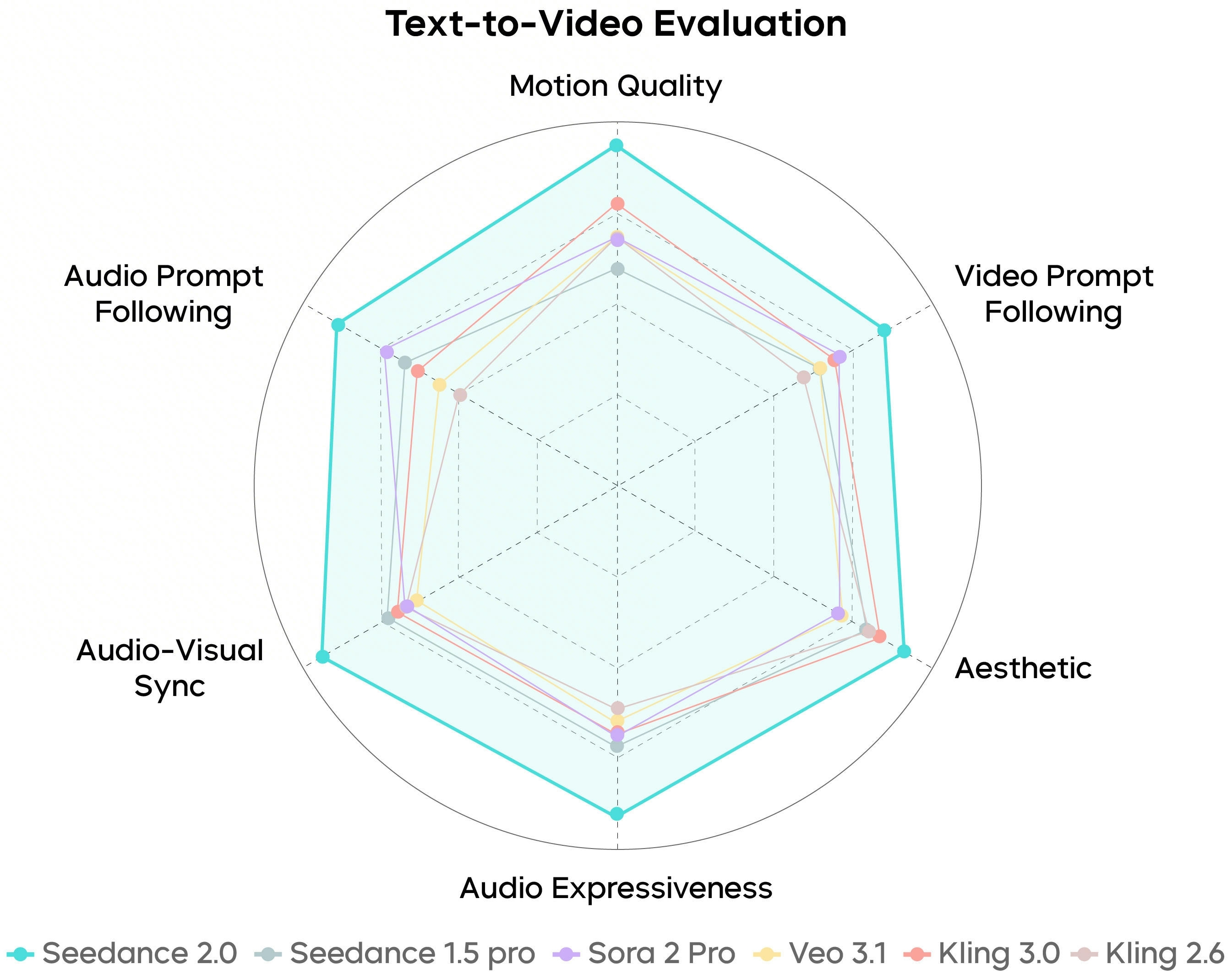
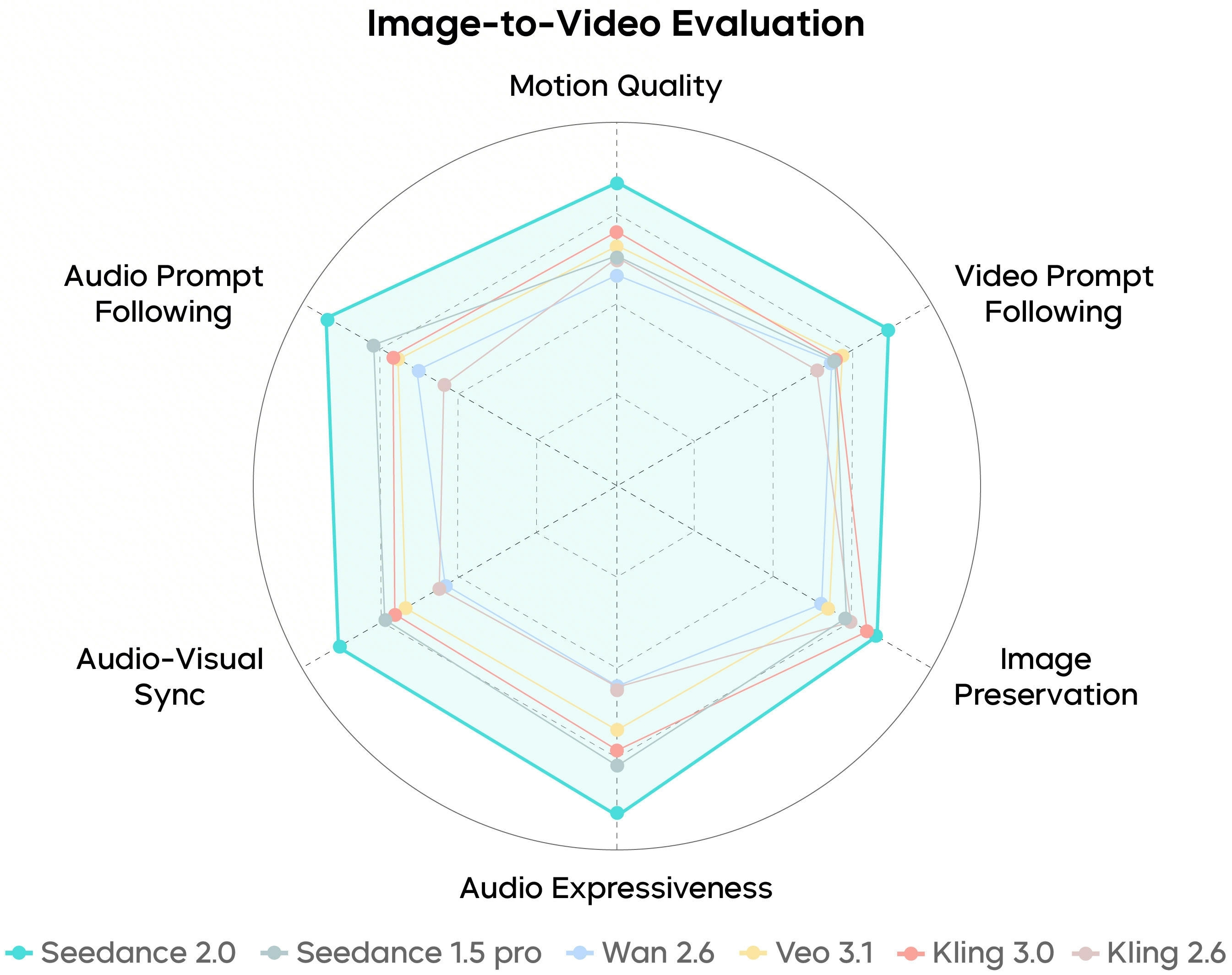
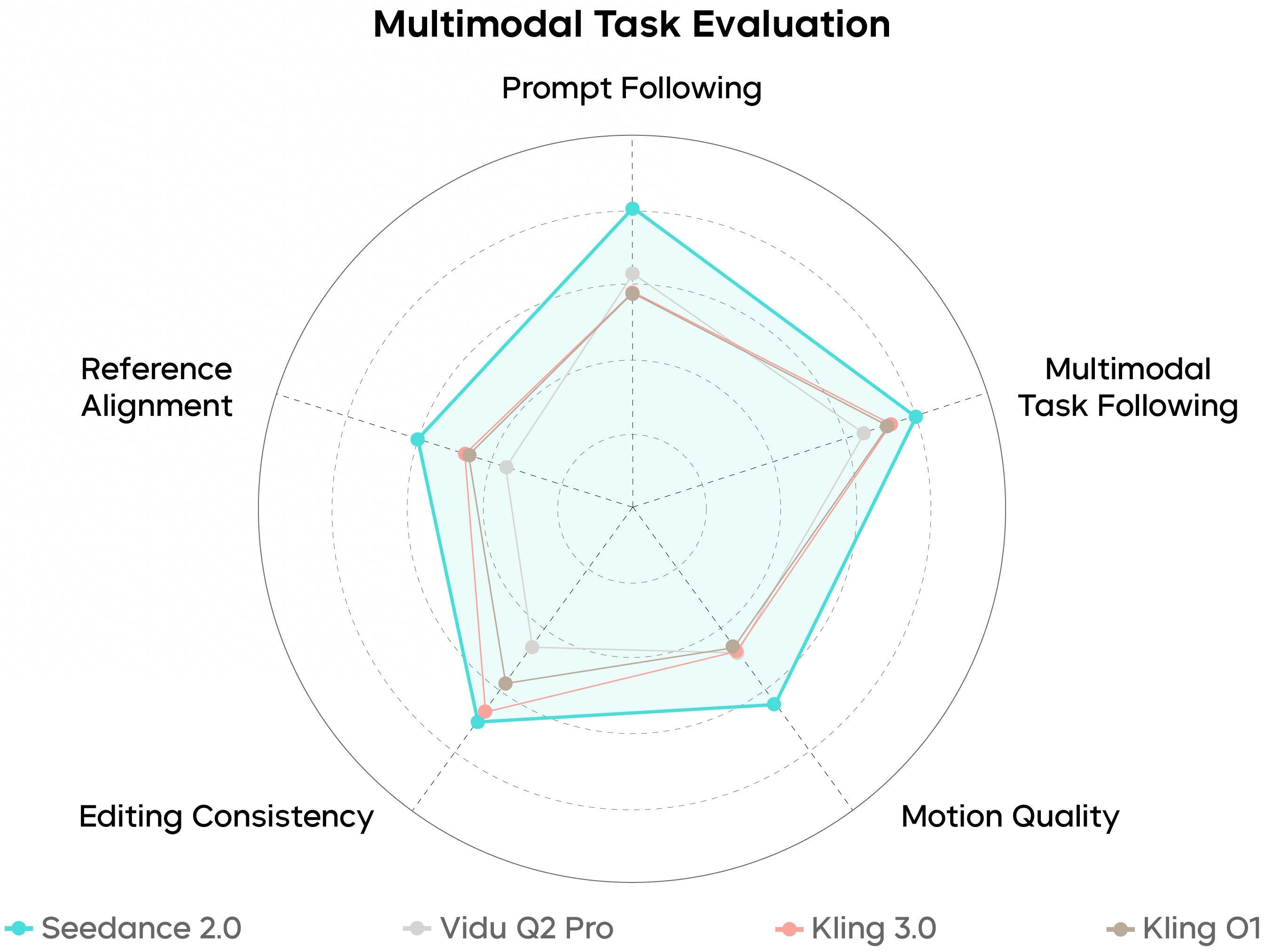
Seedance 2.0
A unified audio–video path: steadier physics, clearer instruction following, and richer reference modes so creative intent survives the first cut—not just the first frame.
Open the LimaxAI video workspaceWide hero demos like our Veo landing—one clip centered at a time—so reviewers can judge motion, not thumbnails.
Three deltas that show up in review—not just in marketing slides.
Fewer accidental shape shifts across frames; better for faces, products, and logos that must stay recognizable.
Gravity, contact, and parallax cues that read correctly at normal playback speed.
Describe lens, pacing, and beats in plain language—then iterate with small deltas instead of full rewrites.
Three short loops that map to common delivery asks: macro detail, tabletop ASMR energy, and handheld walkthroughs.
Lock a hero object, keep materials crisp, and let the camera move without smearing fine detail.
Controlled reflections and edge stability for shots that need to survive a zoomed QC pass.
Parallax and depth that stay consistent as the camera drifts—useful for interiors and lifestyle scenes.
Browse our curated showcase to spark your next great idea.
Reference-first workflows, temporal stability, physics plausibility, and instruction following—aligned with how teams brief promos, social cuts, and product demos.
Plates that survive first-pass color: skin tones, materials, and specular discipline so downstream grading does not fight the generation.
Fewer accidental deformations across frames—useful for faces, logos, and hero products that must stay recognizable while the camera moves.
Pair prompts with images, audio, or short reference clips where your pipeline allows—so lens grammar and pacing survive compression in the brief.
Start from a prompt, anchor layout with a still, or lean on multimodal references when you need repeatable style and motion cues across iterations.
What matters for delivery: inputs, resolution, aspect ratios, and pipeline notes so you can match edit and distribution.
Model
Seedance 2.0
Latest-generation video model on LimaxAI, continuously improved.
Generation speed
Fast iteration
Optimized video stack balancing speed and quality; actual time varies with length, resolution, and queue.
Inputs
Text or first-frame image
Pure prompts or an uploaded frame to anchor layout and identity before motion is synthesized.
Output resolution
HD video
High-definition exports suitable for professional review and social delivery.
Camera control
Promptable moves
Describe pans, tilts, pushes, and handheld energy directly in the prompt.
Aspect ratios
Landscape & portrait presets
Common 16:9 and 9:16 presets aligned with web, ads, and short-form feeds.
Write the shot like a brief, pick duration and aspect, export a clip you can drop on a timeline.
Cover environment, subject, motion, mood, and camera verbs (wide establishing, slow push-in). Add a first-frame image when you need a locked composition.
Match the destination channel—vertical for feeds, horizontal for web—then balance cost vs. stability with quality presets.
Scrub quickly on a timeline mental model: check motion and composition, then export a clean file for edit, VO, and finishing.
Teams and creators who need dependable motion and crisp imagery without a full production calendar.
Generate strong b-roll and concept shots to keep publishing cadence high.
Spin up product explainers and campaign visuals without blocking on a shoot day.
Keep visual language consistent while testing multiple angles and hooks.
Prototype cinematics and trailer beats before committing to expensive capture.
You can generate multi-second to tens-of-seconds clips depending on settings and complexity. Treat each run as a modular shot for editing rather than a full finished film in one pass.
HD-class outputs are available for social, pitch decks, and internal reviews. Pick the tier that matches your delivery target.
Upload a first frame; the model infers plausible continuation so motion feels anchored to your layout and subject.
Yes, subject to LimaxAI terms and applicable model policies. Validate compliance for regulated industries before large campaigns.
Be specific about lighting, materials, camera grammar, and pacing. Iterate in small prompt deltas instead of rewriting everything each time.
No. LimaxAI is an independent product. Model capabilities, quotas, and terms follow your agreement and in-product settings.
LimaxAI is an independent product. Model features, quotas, and terms follow your agreement and in-product settings.
Video workflow
Turn a written brief into a clip you can cut—without losing a week to scheduling.