AI Photo Effects

Fun portraits

AI Graffiti Wall Photo

Photo doodles & stickers

AI Doodle on Photo

Journals & Creative Collage

AI Scrapbook Photo Collage

Magazines & Covers

AI Birthday Magazine Cover

Yarn & Clay Dolls

AI Crochet Doll Photo
Explore all effects →
Resources
PricingAPI Platform
AI Photo Effects/AI Doodle on Photo

Photo doodles & stickers

AI Doodle on Photo

Add hand-drawn decorations, colorful stars, outline doodles or mini characters to your photo, or build a creative collage. Keep your subject recognizable while choosing a new visual style.

Upload a photo

Choose a style

Output settings

Aspect ratio

Purpose

Keep the complete template design and balance the subject, headline and collage elements.

Resolution

Sign in to see credits

Creation history

Recent creations for this effect

Your next creative photo starts here

Upload a photo and choose a style. Your generated images will appear here.

Explore the effect ↓

AI Doodle on Photo

Effect examples and creative inspiration

Start creating ↑
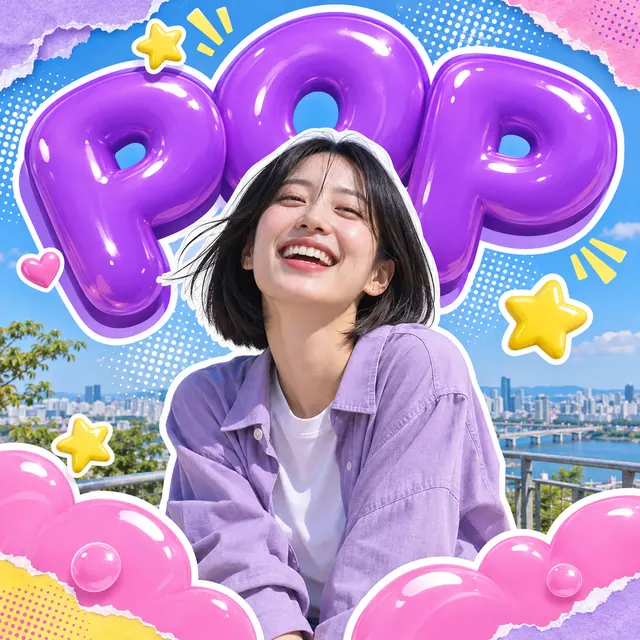
AI Doodle on Photo — Bubble Pop
Bubble PopInflated lettering, sticker outlines and torn-paper layers turn a portrait into a pop poster.Start creating
AI Doodle on Photo — Mood Bubbles
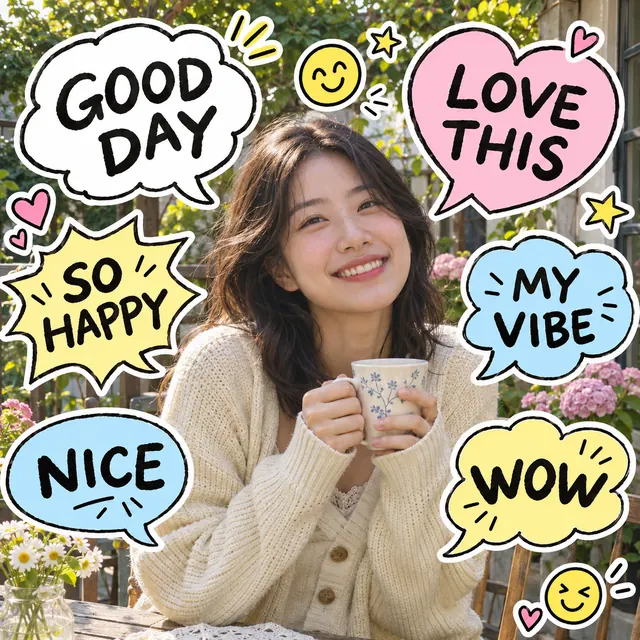
Mood BubblesHandwritten speech bubbles, short mood phrases and expressive doodles surround your photo.Start creating
AI Doodle on Photo — Retro Film
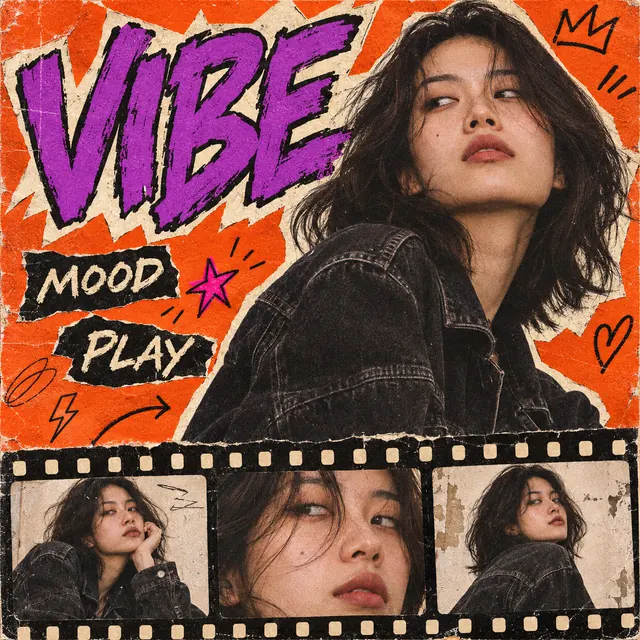
Retro FilmOrange-and-purple zine graphics, bold lettering and a filmstrip create an analog portrait collage.Start creating
AI Doodle on Photo — Travel Journal
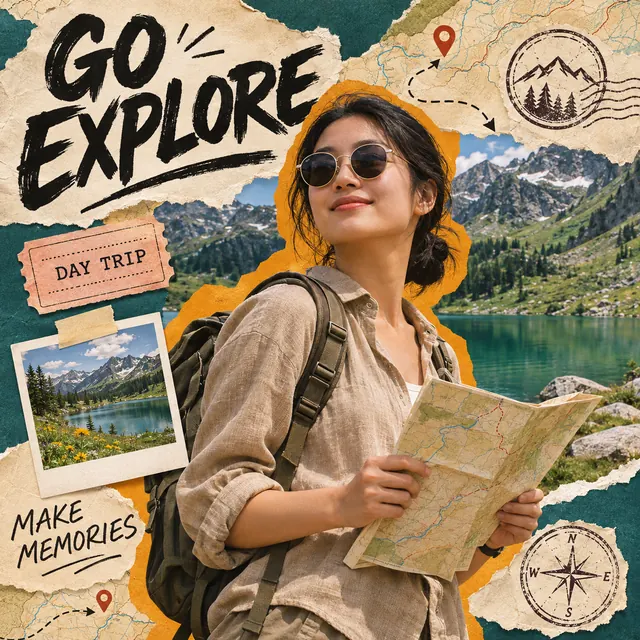
Travel JournalMaps, ticket-shaped accents, stamps and torn-paper layers build a travel scrapbook poster.Start creating
AI Doodle on Photo — Color Stars
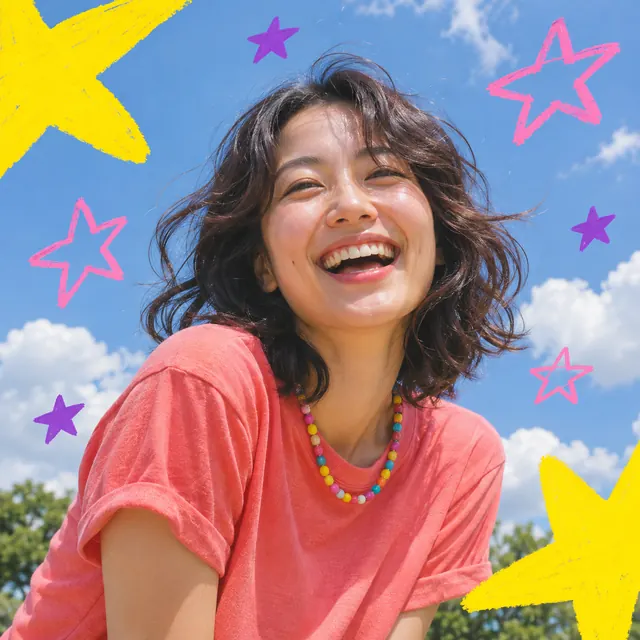
Color StarsKeep the original scene and add bold yellow stars, purple shapes and playful pink marker strokes.Start creating
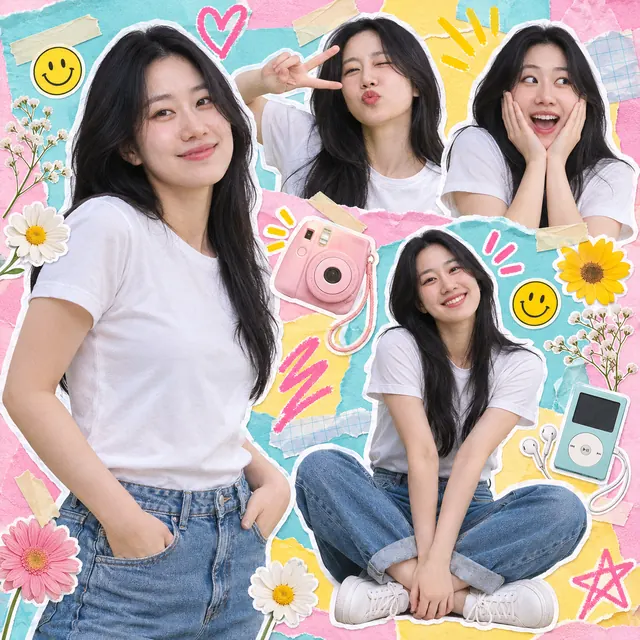
AI Doodle on Photo — Youth Collage
Youth CollageRepeat the same person in a colorful photo scrapbook with white cutout borders, paper, tape and playful doodles.Start creating
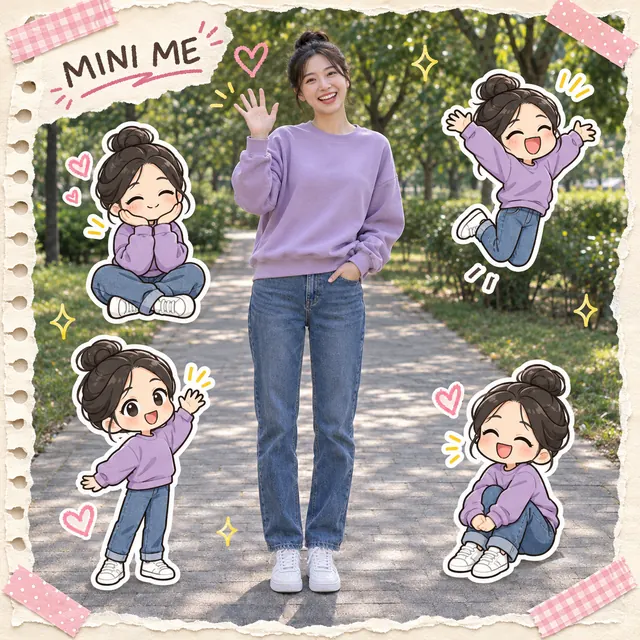
AI Doodle on Photo — Mini Me
Mini MeKeep the real portrait and surround it with chibi versions sharing the same hairstyle and outfit in a soft scrapbook frame.Start creating
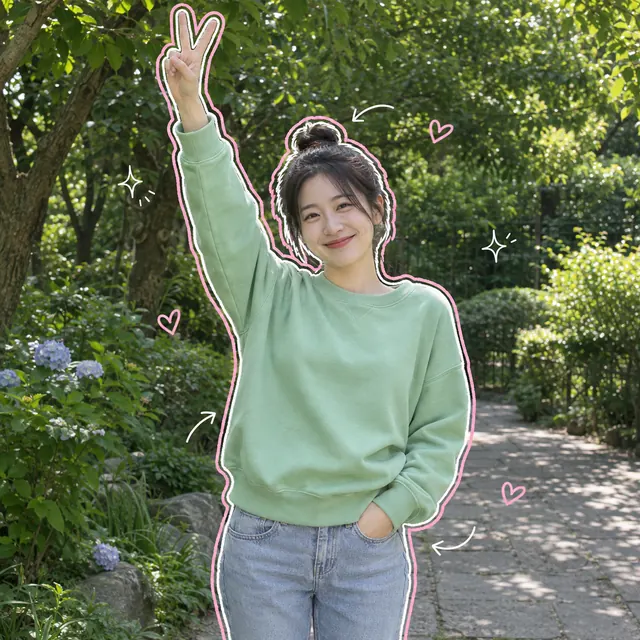
AI Doodle on Photo — Sketch Outline
Sketch OutlineTrace the subject with loose white and pink outlines, adding sparse hearts, arrows and sparkles over the original photo.Start creating

AI Doodle on Photo · Key features

A complete photo effect, not just different stickers
01

A complete photo effect, not just different stickers

Build the whole composition around your uploaded subject: oversized bubble letters, reaction bubbles, film panels or layered paper. Each template changes the graphic layout and background treatment while asking the AI to preserve recognizable identity. Review faces and text before sharing.

Start creating →
Typography, texture and composition working together
02

Typography, texture and composition working together

Bubble Pop uses inflated lettering and foreground depth. Mood Bubbles surrounds the photo with playful reactions. Retro Film combines orange-and-purple print textures with repeated crops of the same reference. Travel Journal builds a tactile map-and-paper collage. Each has its own prompt and preview.

Start creating →
Adapt the full design to its destination
03

Adapt the full design to its destination

Choose a ratio and destination to position the face, headline and graphic elements. Stories reserve space for interface overlays. Profile pictures switch to 1:1 and simplify small text or secondary film panels for readability. Download your result and upload it to your platform.

Start creating →

Photo doodles for posts, Stories and profile pictures

Create a social image with a complete visual theme: bubble lettering for a bold portrait, reactions for a mood post, film panels for an editorial look or layered paper for travel inspiration. Destination settings adapt the composition while retaining the chosen template.

Instagram feed

Try 4:5, 3:4 or 1:1 with a strong focal point and the full template style.

Create my social photo

Stories / Status

Try 9:16. Keep faces, headlines and key panels away from top and bottom interface areas.

Create my social photo

Profile picture · 1:1

Switches to 1:1 and simplifies small text and secondary panels to prioritize the face.

Create my social photo

AI Doodle on Photo · Step-by-step guide

  1. 01

    Upload a clear photo with breathing room

    Choose a clear JPG, PNG or WebP up to 20 MB with an unobstructed face. Half-body portraits leave room for typography and collage panels; travel photos can provide scene details.

  2. 02

    Choose a complete style and optional wording

    Choose Bubble Pop, Mood Bubbles, Retro Film or Travel Journal. Templates include short decorative captions. Enter exact wording, color preferences or “no text” in the optional details to customize the result. Review generated lettering and facial details.

  3. 03

    Set your ratio, destination and resolution

    Choose a square, portrait or landscape ratio and a sharing destination. Profile pictures switch to 1:1. Default 1K costs 4 credits, 2K costs 8 and 4K costs 12. Destination presets add no charge; check the total below the creation button.

  4. 04

    Review, download and post

    Follow progress in your creation history. Check faces, hands, sticker edges and spacing, then download the original result format and upload it to your platform. Changing settings does not edit an existing result; generating again creates a new paid task.

AI Doodle on Photo · Frequently asked questions

What is AI Photo Doodle?

Build the whole composition around your uploaded subject: oversized bubble letters, reaction bubbles, film panels or layered paper. Each template changes the graphic layout and background treatment while asking the AI to preserve recognizable identity. Review faces and text before sharing.

Which photos work best?

Choose a clear JPG, PNG or WebP up to 20 MB with an unobstructed face. Half-body portraits leave room for typography and collage panels; travel photos can provide scene details.

Will facial features stay exactly the same?

The source guides the result, but AI can change facial details, clothing and composition. Review the image before sharing.

Do I need to write a prompt?

Choose Bubble Pop, Mood Bubbles, Retro Film or Travel Journal. Templates include short decorative captions. Enter exact wording, color preferences or “no text” in the optional details to customize the result. Review generated lettering and facial details.

How do I choose ratio and resolution?

Choose a square, portrait or landscape ratio and a sharing destination. Profile pictures switch to 1:1. Default 1K costs 4 credits, 2K costs 8 and 4K costs 12. Destination presets add no charge; check the total below the creation button.

What format is the downloaded image?

Downloads preserve the generated image’s original format without conversion.

How long does generation take?

Timing depends on service load, input and output settings. Check creation history for progress. Review a failure before submitting again; a new submission may incur a new charge.

Is generation free?

Generation uses account credits according to current pricing. Sign in to see the estimate before submitting and check the pricing page for plans.

Pricing →
Can I try group photos?

You can experiment, but multiple faces and occlusion increase uncertainty. Start with a clear single-person photo.

Which other effect should I try?

Choose Graffiti Wall Photo for a person beside a cartoon mural, or Photo Doodle for hand-drawn decorations around a photo. Use the related links below to switch.

Can I make doodle photos for social media?

Yes. Upload a selfie or travel photo, choose a palette and destination, then generate and download your result. Upload it to your platform yourself and review the crop before posting; the tool does not publish automatically.

How do I make a Story or a doodle profile picture?

Try 9:16. Keep faces, headlines and key panels away from top and bottom interface areas. Switches to 1:1 and simplifies small text and secondary panels to prioritize the face.

Can I move or delete individual stickers?

The tool generates a complete image from the template and optional instructions. It does not offer individual editable layers. Change your wording or layout request and generate again; new tasks use credits.

Will doodles cover the face?

The prompt asks for a clear face and decorations around the subject, but AI can still make mistakes. Choose a photo with breathing room and request an unobscured face. Check the result before sharing.

Does 4K fix a blurry source photo?

A higher output resolution does not guarantee recovery of missing facial detail. Start with a clear photo and use 1K to explore the composition. Choose 2K or 4K when you need a larger output.

Does photo to doodle turn the whole photo into line art?

It is not a full-image sketch converter. This photo to doodle tool combines a photographic subject with lettering, reaction bubbles or collage layouts. Templates can change the background treatment and composition.

Will an AI sticker collage change the background?

Color Stars and Sketch Outline retain the original scene with light decorations. Youth Collage repeats the same person in generated poses, while Mini Me surrounds a photographic portrait with matching chibi stickers. Poster and scrapbook templates may rebuild the background. Identity preservation is a goal, not a guarantee of pixel-perfect fidelity.

Can I add handwritten words to the photo?

Templates include short decorative captions. Supply exact wording to replace them, or request “no text.” AI may make spelling or lettering errors, so check before posting. Captions are design elements rather than claims about real events.

Does Mini Me turn my whole photo into a cartoon?

No. The main portrait stays photographic, while small cartoon counterparts borrow the reference hairstyle, outfit and facial cues. AI can vary details; review the result before sharing.

Can Youth Collage create different poses from one photo?

It uses your photo as an identity reference to generate several creative poses in one collage. These are AI-created variations, not photographs of separate real moments. A clear reference helps maintain a consistent face.

More photo effects