
Holidays & Seasons

Thanksgiving Pet Costume Photo Generator

Make a Thanksgiving pet costume photo from one picture of your dog or cat. The AI adds a turkey-feather outfit and an autumn setting while using the eyes, muzzle and coat markings in your photo as reference. Use the portrait for a family greeting, a pet profile picture or a Thanksgiving post.

Upload a photo

Choose a style

Start with a clear dog or cat photo that shows the eyes, ears and coat markings.

Output settings

Aspect ratio

Purpose

Keep the selected style in a balanced frame for everyday sharing.

Resolution

Sign in to see credits

Creation history

Recent creations for this effect

Your next creative photo starts here

Upload a photo and choose a style. Your generated images will appear here.

Explore the effect ↓

Thanksgiving Pet Costume

Thanksgiving pet costume photo example

Start creating ↑
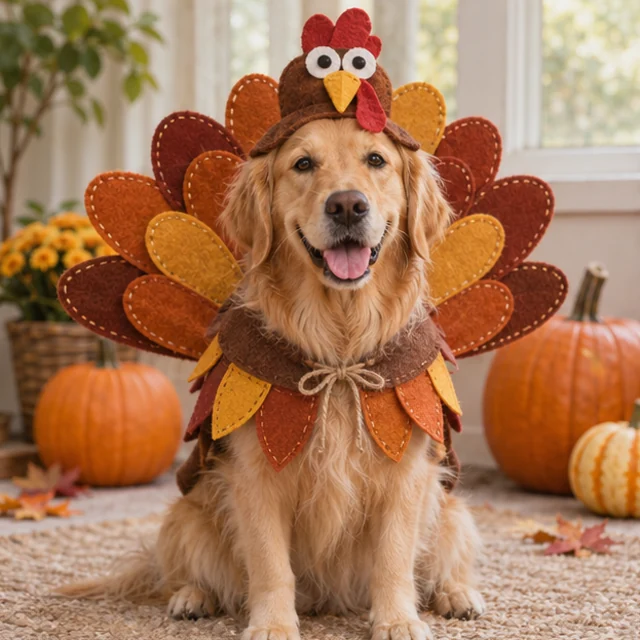
Golden retriever wearing a felt turkey costume in a room decorated with pumpkins
AI-generated style example. The felt tail sits behind the dog, leaving its ears and face visible. The muted pumpkins keep the focus on the pet.

How to make a recognizable Thanksgiving pet portrait

Golden retriever wearing a felt turkey costume in a room decorated with pumpkins
01

Keep the turkey outfit behind the face

A good turkey costume is easy to read at thumbnail size. Leave room behind the shoulders for the fan of felt feathers and ask for the collar to sit below the chin. If your pet has long ears, whiskers or a distinctive dark patch around one eye, mention it in the optional instructions. A single distinguishing feature gives you a specific detail to check when you compare the finished image with the original.

02

Start with a photo at your pet’s eye level

Use a sitting or standing picture with the eyes sharp and the muzzle unobstructed. A room with window light often shows both dark fur and white markings more clearly than a flash photo. For a cat hiding under a blanket or a dog perched beside another animal, choose a different frame with one clear subject. If the original fills the screen with the face, pick a wider photo so the outfit has room to appear.

03

Choose autumn decorations around the pet

A few pumpkins, rust-colored leaves and a wooden floor can establish the setting while keeping the pet easy to spot. Keep props near the edges or behind the pet, especially if the coat already contains orange or brown. To use the portrait as a family greeting, ask for open space above the head or beside the pet so there is room to add your own message after downloading.

04

Give the feathers room in the final crop

For a square avatar, request a compact feather fan and leave a margin above the ears. A 4:5 portrait can show more of the paws, costume and pumpkins. A wide crop leaves space next to the pet for a caption. Review the downloaded image at the size you expect people to see it and check that the eyes, muzzle and costume are recognizable in the same frame.

Start creating →

Share your Thanksgiving pet costume photo

Use a square avatar crop to show the pet’s face and a hint of feathers. A vertical story has room for the full costume and pumpkins. Check the preview before posting so the ears and fan of feathers stay in frame.

Instagram feed

Try 4:5, 3:4 or 1:1. Separate the subject from the background for the mobile feed.

Create my social photo

Stories / Status

Try 9:16. Keep important details away from the top and bottom interface areas.

Create my social photo

Profile picture · 1:1

Switches to 1:1. Center the most recognizable detail with room for a circular crop.

Create my social photo

Make a Thanksgiving pet costume photo

  1. 01

    Upload one pet photo

    Choose a clear JPG, PNG or WebP up to 20 MB. A single dog or cat in steady light gives the tool a clear subject and visible fur detail.

  2. 02

    Choose a crop for the costume

    Set the aspect ratio and resolution before generating. Pick a portrait if you want to keep the paws and the tail of the costume in frame.

  3. 03

    Describe a detail to keep

    For example, ask to keep the white chest patch and the red collar, with a small fan of orange feathers behind the shoulders.

  4. 04

    Generate and review the portrait

    Open the finished image in your creation history. Check the eyes, ears and muzzle against your source photo, then download the version you want to share.

Thanksgiving Pet Costume · Frequently asked questions

Does my pet need to wear a costume in the original photo?

A regular pet photo works. The effect generates the turkey outfit and the background from your reference image. A clear photo of your pet sitting or standing gives the outfit a visible body shape to follow.

Can I make a Thanksgiving costume photo for my cat?

Yes. Use a picture with both ears, eyes and whiskers visible. A sitting cat gives the feather fan room behind its back. In the optional instructions, describe any distinctive face markings that you want to see in the result.

How do I show my pet’s fur color clearly?

Choose a picture where highlights and shadows both contain detail. If your pet’s face is darker than its chest, use light from the front or side and describe the location of any markings you want to keep.

Can I use my pet’s photo for a Thanksgiving card?

Yes. Choose a landscape crop for text beside the pet or a portrait crop for text above or below. Ask for open space in that part of the image and check the composition before adding your greeting in an editor.

Which files can I upload?

Upload one JPG, PNG or WebP image up to 20 MB. If your phone saved the photo as HEIC, export a JPG version and use that as your reference.

What if I have a dark pet or a dark background?

Retake the picture by a window if the eyes disappear into the shadows. With a black coat, look for enough light to see the muzzle and add a lighter wall or floor behind the pet. Describe the original coat color in your instructions so the autumn lighting has less chance of making it look reddish.

How do I make matching portraits for two pets?

Generate a separate portrait from one clear photo of each pet. Request the same feather colors and backdrop in both generations, then combine the downloads in a card editor. Separate portraits give you more room to show each pet’s face and distinctive markings.

More photo effects

AI Graffiti Wall Photo →

Upload a photo, choose a mural style, aspect ratio and sharing destination. Create a personal graffiti portrait for Instagram, Facebook, Pinterest, Stories or your profile picture.

AI Doodle on Photo →

Add hand-drawn decorations, colorful stars, outline doodles or mini characters to your photo, or build a creative collage. Keep your subject recognizable while choosing a new visual style.

AI Scrapbook Photo Collage →

Upload one photo and choose a scrapbook template. Turn travel scenery into postcards, paste a date photo into a memory page, or use torn paper and tape to record an ordinary day.

AI Birthday Magazine Cover →

If the birthday honoree were on this issue's cover, what would you name the magazine? Upload a photo, choose a layout, and write your custom cover title and birthday headline.

AI Crochet Doll Photo →

Turn the main subject in a photo into a crochet doll. Six templates cover single-person dolls, couples, pets, and owner-pet portraits, plus a preview of a mini keychain hanging from a bag.

Pumpkin Mocha Photo →

Create AI fall photos from a selfie or portrait using the Pumpkin Mocha effect. Turn your setting into an autumn café with amber window light, orange foliage and a mug of pumpkin mocha. Start with a clearly lit photo and decide how much of the café you want in the finished picture.

AI Brick Photo Filter →

Use the AI LEGO filter to reimagine a car, building or everyday object as a toy-brick scene. The effect uses your photo as a reference for the silhouette, main colors and camera angle, then adds details such as studs, stacked pieces and visible seams.

90s Yearbook Photo →

Use the AI yearbook generator to turn one selfie into a 90s school portrait. The effect recreates the look of a studio portrait with a mottled backdrop, soft flash and period-inspired clothing. Upload a clear head-and-shoulders photo and specify any familiar details you want to keep.

Explore all effects →

Turn everyday photos into something playful. Choose an effect to start creating.